Blood Strike Bio Color 2026: 8 Codes + Free Bio Generator
Blood Strike bio color is a set of eight one-letter codes that colour text in your Blood Strike profile bio. It covers codes like #R #B #G #Y #O #P #W #E. Blood Strike bio color works by typing a code in front of the words you want coloured, then saving the bio.
By Hoàng Dương Dũng, founder of NickGen · Updated October 7, 2026 · Codes tested in the live Blood Strike profile bio, July 2026; re-check pending for the next game update.
Want the name to match the bio? Pick a tag from our Blood Strike names lists, then colour the same words here.
Symbols and kaomoji to pair with a coloured bio
Symbols and kaomoji can sit next to coloured words in your bio, for example #RGHOST ☠. NickGen has not checked whether a symbol picks up the colour code, so look at your profile after saving. These come from the NickGen symbol library.
Symbols
Kaomoji
On this page
- Blood Strike bio color generator
- Blood Strike bio color codes (full list)
- How to add color to your Blood Strike bio
- How to use multiple colors in one bio
- Ready-made colored bio ideas
- Symbols and kaomoji to pair with a coloured bio
- Do color codes work in your Blood Strike name?
- Why your bio color isn’t showing
- FAQ
Blood Strike bio color generator
Type your bio, pick a colour, then tap each word to paint it. The tool builds the exact code string you paste into Blood Strike — nothing is stored, and it runs entirely in your browser. Prefer stylish letters and symbols too? Pair this with the NickGen — Blood Strike name generator.
Blood Strike bio color codes (full list)
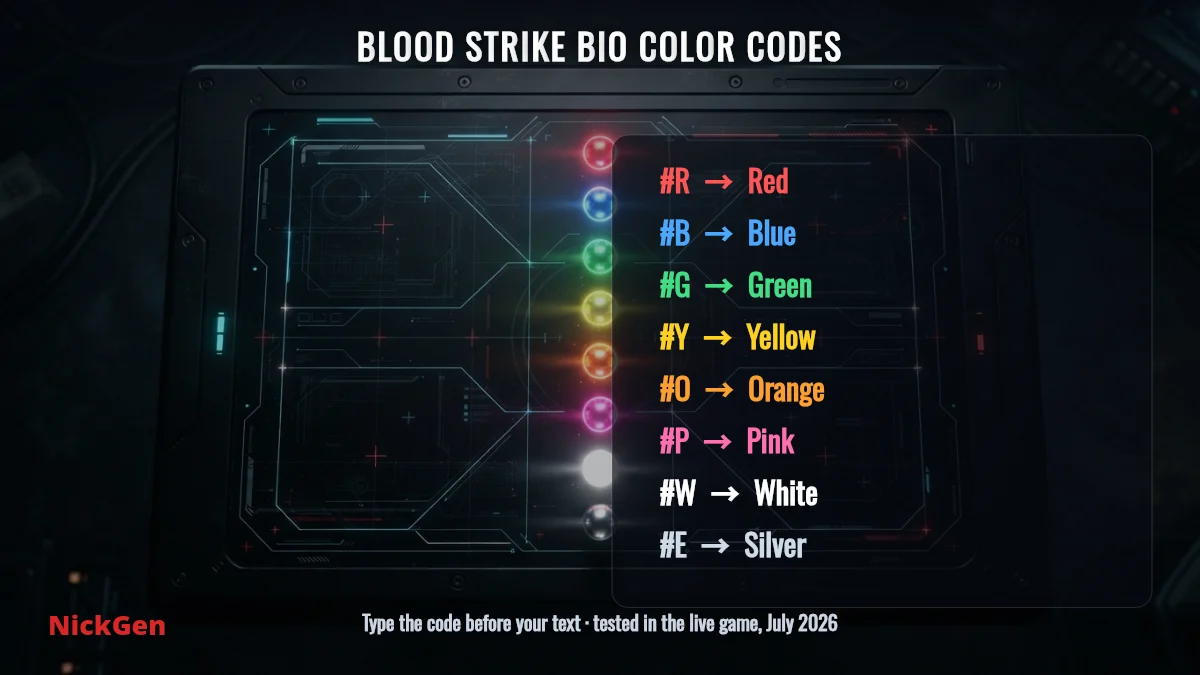
Blood Strike gives you eight bio color codes. Each is a hashtag plus the first letter of the colour, and it recolours every character that follows until the next code. Tap any code below to copy it, then place it in front of the word you want coloured in your bio.
| Code | Colour | Tap to copy |
|---|---|---|
| #R | Red | #R |
| #B | Blue | #B |
| #G | Green | #G |
| #Y | Yellow | #Y |
| #O | Orange | #O |
| #P | Pink | #P |
| #W | White | #W |
| #E | Silver / grey | #E |
These eight are the only colours the bio field recognises — there is no hex-code system like some other games use, so a code such as #FF0000 will simply show as plain text. Stick to the single letters above.
How to add color to your Blood Strike bio
Adding colour takes about a minute. You type the code and your text on this page, copy it, and paste it into the bio field inside the game.
- Build your text above — type your bio in the generator, tap the words you want coloured, and hit Copy.
- Open Blood Strike and tap your avatar in the top-left of the lobby to open your profile.
- Tap Edit (the pencil) next to your profile, then select the Bio / Signature field.
- Long-press the field and choose Paste. Your codes appear as plain text while editing.
- Tap Confirm / Save. Back on your profile the codes disappear and the text shows in colour.
If you would rather type it by hand, just write the code and text together, for example #RGG WP to make “GG WP” red. A space does not cancel the colour — only the next # code does.
How to use multiple colors in one bio
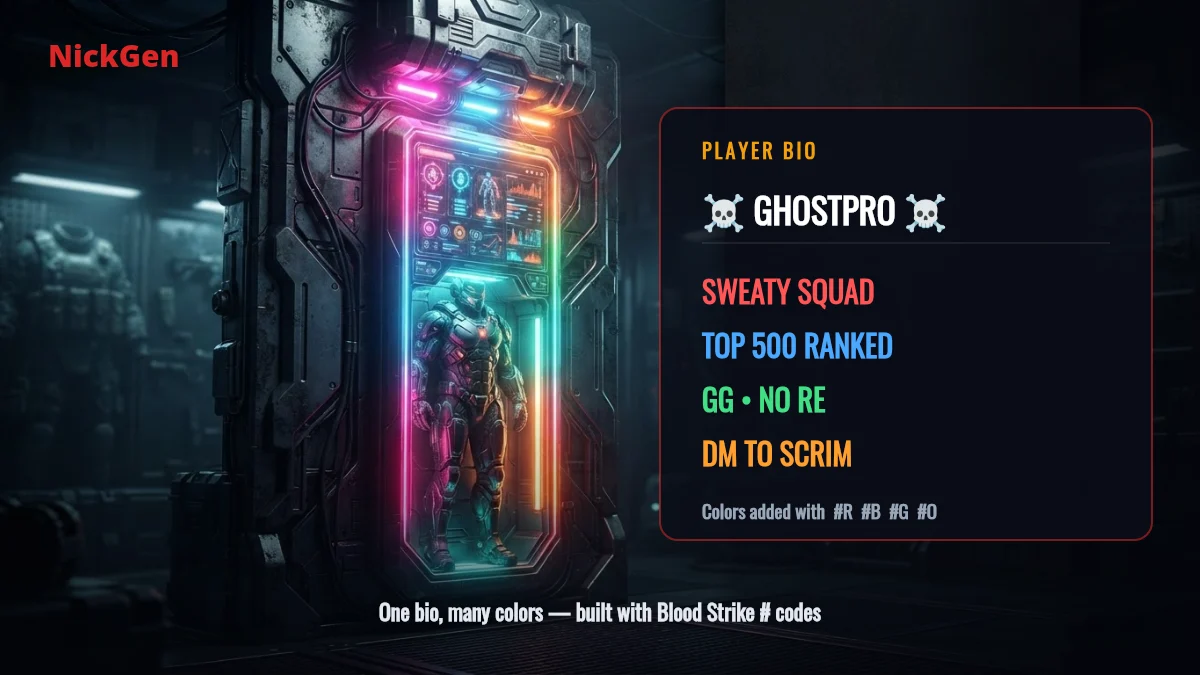
To mix colours, place a new code wherever you want the colour to change. Each code overrides the previous one from that point on. For example, #RSWEATY #BSQUAD shows “SWEATY” in red and “SQUAD” in blue.
A few things worth knowing when you stack colours:
- Colour carries across spaces.
#GNO REpaints both words green — you only add a second code to change colour. - Use
#Wto return to white after a coloured section, since there is no separate “reset” code. - Keep it readable. Two or three colours look sharp; a rainbow of eight per word gets noisy and hard to read on small screens.
Ready-made colored bio ideas
Tap any bio to copy the ready-made code string, paste it into your profile, and tweak the words. These are built only from the eight official codes, so they render for every player.
Do color codes work in your Blood Strike name?
No — the color codes only work in the bio / signature field, not in your player name. The name field renders the #R tags as literal text, so you would just see the hashtags in your tag. To style your name instead, use Unicode letters and symbols, which the name field does accept.
Why your bio color isn’t showing
If a colour won’t appear, it is almost always one of these:
- Wrong letter. Only the eight codes work.
#Blor#Redwon’t — it must be exactly#R,#B,#G,#Y,#O,#P,#Wor#E. - You’re still in edit mode. Codes show as plain text while typing; the colour only appears after you save and view the profile.
- Missing the
#. The hashtag is what triggers the colour —R GHOSTstays white,#RGHOSTturns red. - A space isn’t a reset. If a later word is the wrong colour, add
#W(or the colour you want) in front of it.
Codes and behaviour were checked in the live Blood Strike bio field in July 2026. Blood Strike updates often, so if a code ever changes, the generator above is refreshed to match.
Blood Strike bio color FAQ
What are the Blood Strike bio color codes?
There are eight: #R red, #B blue, #G green, #Y yellow, #O orange, #P pink, #W white and #E silver. Type the code in front of the text you want coloured in your bio.
How do I put color in my Blood Strike bio?
Build the text in the generator above and copy it, open your profile in Blood Strike, tap Edit, paste it into the bio field, and save. The codes turn into coloured text once the profile is saved.
Can I use more than one color in my bio?
Yes. Add a new code wherever you want the colour to change — for example #RSWEATY #BSQUAD gives red then blue. Each code overrides the previous one until the next code appears.
Do the color codes work in my Blood Strike name?
No. Color codes only work in the bio field. For a styled name, use Unicode letters and symbols from the special characters tool instead.
Is there a hex color code for Blood Strike bios?
No. Blood Strike uses the eight single-letter codes only, not hex values. A code like #00FF00 will show as plain text, so use #G for green instead.
Is NickGen affiliated with Blood Strike or NetEase?
No. NickGen is an independent, free fan tool and is not affiliated with, endorsed by or sponsored by NetEase or Blood Strike.
Independent & honest: NickGen is a free tool built and tested by Blood Strike player Hoàng Dương Dũng. Not affiliated with NetEase or Blood Strike. Bio color codes are an in-game feature; the generator here just builds the text — nothing you type is stored.
Related articles
How to Change Your Blood Strike Name 2026 (Free Name Change Card)

Blood Strike Codes October 2026: 7 Codes to Copy & Check